
Any website running on HTTPS has an SSL certificate installed on its server. This free SSL checker lets you verify that certificate instantly. Enter any domain and see whether the certificate is valid, when it expires, who issued it, and how secure it is. No login needed and no technical knowledge required.
Enter a Domain to Check Its SSL Certificate
See if a website's SSL certificate is valid, when it expires, who issued it, and how secure it is. Works for any domain worldwide.
What This Tool Checks
When you run a check, the tool connects to the domain in real time and reads the live SSL certificate. It then shows you a clear report with everything that matters.
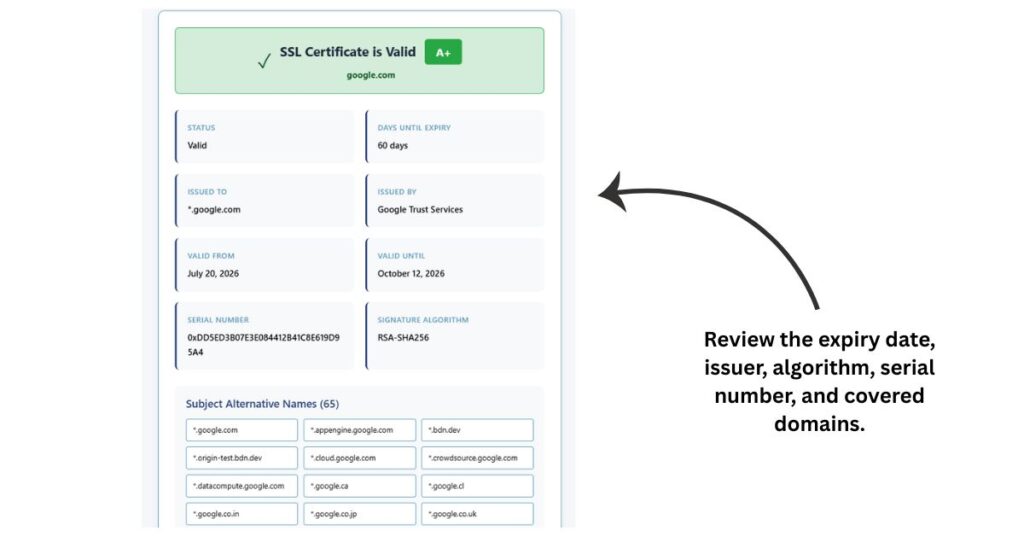
Certificate status shows whether the SSL is currently valid, expired, or not yet active.
Days until expiry tells you exactly how many days are left before the certificate expires so you can plan a renewal in time.
Issued to shows the domain or organization name the certificate was issued for.
Issued by identifies the Certificate Authority that signed and verified the certificate. Common ones include DigiCert, Let’s Encrypt, and Sectigo.
Valid from and valid until give you the exact start and end dates of the certificate.
Security grade gives an automated rating from A+ to F based on the certificate’s encryption strength, algorithm, and expiry timeline.
Signature algorithm shows whether the certificate uses modern, trusted standards like SHA-256 or older, weaker ones like SHA-1.
Serial number is a unique identifier assigned to the certificate by the issuing authority.
Subject Alternative Names list all the domains and subdomains covered under the same certificate.
How to Use the SSL Certificate Checker
Step 1 –
Type the domain you want to check into the input field. You can enter it with or without www. The tool handles both formats.
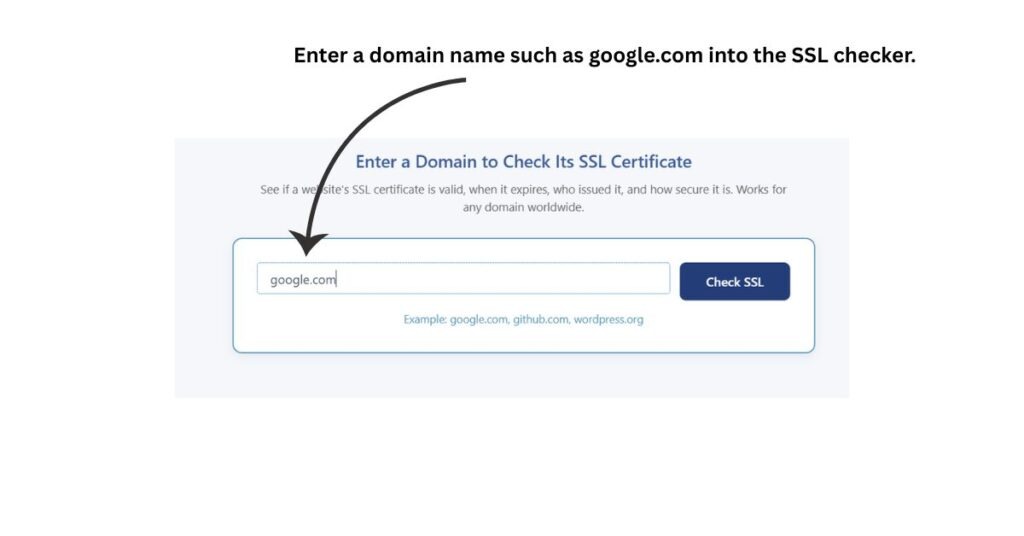
Step 2 –
Click the Check SSL button. The tool connects to the domain, do the ssl certificate test, and reads the certificate directly.
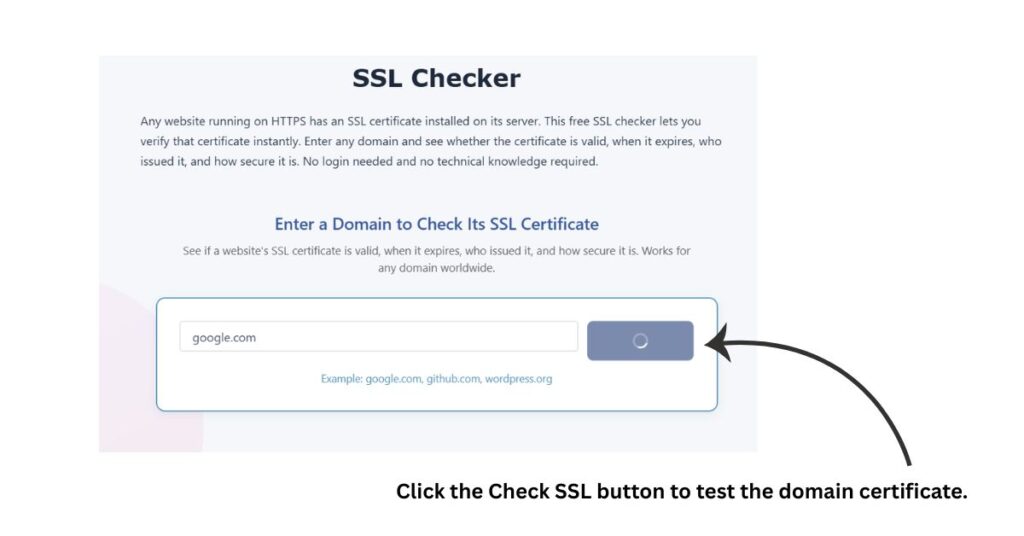
Step 3 –
Review the results. You will see the status banner at the top showing valid, expired, or expiring soon along with the security grade.
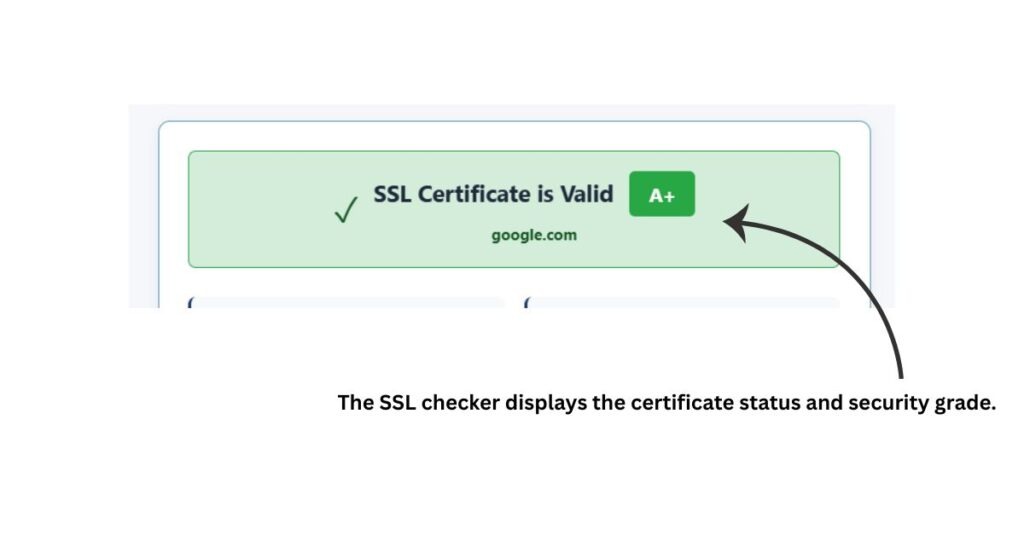
Step 4 –
Read the detailed report below the banner. It covers expiry date, issuer, algorithm, serial number, and covered domains.
The whole process takes a few seconds. There is nothing to install or configure.
Who can use this tool
Website owners use it to check ssl certificate expiry before it causes browser warnings. A 30 day advance check is a good habit.
Web developers verify ssl certificate installation after deploying a new site or completing a domain migration. It confirms the certificate is live and correctly configured without opening server panels.
SEO professionals use it to confirm that HTTPS is properly set up. Search engines treat HTTPS as a ranking signal. A broken or expired certificate can quietly hurt your search visibility.
Digital agencies monitor certificates across multiple client websites to ensure every site stays secure and compliant at all times.
Security professionals run quick checks to review the issuer, encryption standard, and certificate health before conducting deeper audits.
Business owners check vendor and partner websites to confirm their Transport Layer Security setup is trustworthy before sharing sensitive information with them.
Frequently Asked Questions
What is an SSL certificate?
An SSL certificate is a small digital file installed on a web server. It encrypts the data exchanged between the server and the browser. It also verifies that the website is owned by a legitimate entity. When a site has a valid SSL certificate, the browser shows HTTPS and a padlock icon in the address bar.
Why does an SSL certificate expire?
SSL certificates are issued for a fixed time period, typically one year. This is intentional. Shorter validity periods reduce the window of risk if a certificate is ever compromised. When the period ends, the certificate must be renewed to stay trusted by browsers.
What happens when an SSL certificate expires?
Browsers block access to the site and show a security warning. Visitors cannot proceed without manually bypassing the warning, which most people will not do. It causes an immediate drop in traffic and damages user trust.
What does the security grade mean?
The grade rates the overall health of the certificate from A+ down to F. It factors in how many days are left before expiry, the signature algorithm in use, and the current validity status. An A+ means the certificate is in good shape. An F means it is expired or critically weak.
Can I check ssl certificate for any domain worldwide?
Yes. The tool works for any publicly accessible domain. You can verify ssl certificate details for your own site, a client site, or any domain you want to assess.
What is a Subject Alternative Name?
A Subject Alternative Name or SAN is an extension in the SSL certificate that lists additional domains and subdomains the certificate covers. For example, a single certificate might cover example.com, www.example.com, and blog.example.com all at once.
How do I know if my SSL is correctly installed?
If the tool shows a valid status with a green banner and a grade of A or A+, your SSL is correctly installed and trusted. If you see errors about the certificate chain, domain mismatch, or weak algorithms, there is a configuration issue that needs fixing.
How often should I check my SSL certificate?
Once a month is a reasonable habit for most website owners. Always check immediately after installing a new certificate or making server changes. Set a reminder at 30 days before expiry so you have enough time to renew without any downtime.
Is this SSL checker tool free?
Yes, completely free. There is no registration, no payment, and no usage limit. Anyone can check ssl online as many times as needed.
What is the difference between SSL and TLS?
SSL stands for Secure Sockets Layer. TLS stands for Transport Layer Security. TLS is the modern, updated version of SSL. Most certificates today technically use TLS, but the term SSL is still widely used because it became familiar first. When people say SSL certificate they almost always mean a TLS certificate.
Disclaimer: Results from this tool are provided for informational purposes only. While we strive for accuracy, we cannot guarantee that every result is complete or error-free. Always verify important findings using additional methods before making security, technical, or business decisions.
More Website Security & Analysis Tools
Inspect HTTP response headers returned by any website or server.
Scan common TCP ports to identify publicly accessible services.
Find the TLS version supported by a website’s server.
View DNS records including A, MX, TXT, NS and CNAME.
Check HTTP response codes returned by any webpage.