
WordPress is the world’s most popular CMS, and the #1 target for automated attacks. Our free WordPress security scanner instantly checks your site for outdated software, missing headers, exposed files, and plugin vulnerabilities. No login, no installation, and zero data storage, just your URL and 30 seconds to a clear, actionable security report.
Check Any WordPress Site for Security Risks - Free
Enter any WordPress URL below to instantly scan for outdated software, exposed files, weak headers, vulnerable plugins, and misconfigurations. No login required.
Scanned: —
Vulnerability Database: The plugin CVE data is based on known vulnerabilities up to April 2026. Always verify with official sources (WPScan, Patchstack, NVD) before acting on any report.
Check Any WordPress Site for Risks
Enter any WordPress URL and instantly scan for:
- Outdated core, plugins, and themes
- Missing or misconfigured security headers
- Directory listings and exposed sensitive files
- XML‑RPC abuse risks
- User enumeration through author archives and REST API
- Known plugin vulnerabilities (matched against an up‑to‑date database)
- No login, no installation, no data storage. Just your URL and 30 seconds.
What This Tool Does (and What Makes It Different)
Our wordpress scanner works like a browser: it sends safe, read‑only HTTP requests to your site and analyses the responses. It checks against WordPress security best practices and a curated database of known vulnerabilities (verified April 2026).
What sets us apart from other free online wordpress scanners:
- Privacy‑first: We don’t store scan results, IP addresses, or any data. Your scan is completely private.
- Ethical by design: We never attempt login attempts (the “admin” probe is removed) or perform intrusive actions that could trip WAFs or legal boundaries.
- SSRF‑protected & DNS‑rebinding safe: Your scan target is pinned to its resolved IP, preventing attackers from redirecting the scanner to internal networks.
- Rate‑limited: Per‑IP and global limits prevent abuse and keep the service reliable for everyone.
- Honest plugin checking: We actually try to read your plugin’s readme.txt to verify the installed version—not just compare against the latest API version. If we can’t verify, we tell you, so you never get a false sense of security.
The result is a fast, trustworthy, and non‑aggressive security spot‑check that respects both your site and the sites you scan.
What our WordPress Scanner Checks (Detailed List)
| Check | What We Look For |
|---|---|
| WordPress Core Version | Is your WordPress up‑to‑date? We compare your detected version with the latest stable release. |
| SSL / HTTPS | Is your site served over HTTPS? We flag plain HTTP as a high‑risk vulnerability. |
| Security Headers | We test for X‑Frame‑Options, X‑Content‑Type‑Options, X‑XSS‑Protection, Content‑Security‑Policy, Referrer‑Policy, and Strict‑Transport‑Security. |
| Directory Listing | We check /wp-content/, /wp-content/plugins/, /wp-content/themes/, and /wp-includes/ for open directory indexes. |
| Sensitive Files | We look for publicly accessible readme.html, wp-config-sample.php, .git/, .env, phpinfo.php, debug.log, and error_log. |
| XML‑RPC | We test if xmlrpc.php is active and responds to method calls—a common vector for brute‑force and DDoS attacks. |
| User Enumeration | We test both the classic ?author=1 redirect and the REST API endpoint /wp-json/wp/v2/users. |
| Plugin Vulnerabilities | We detect plugin slugs from your page source, then check them against our curated vulnerability database. We try to read your actual readme.txt to get the installed version for accurate risk assessment. |
| Theme Detection | We reveal the active theme name if it’s exposed in the HTML source. |
Each finding comes with a severity level (Critical, High, Medium, Low), a plain‑English explanation, and a step‑by‑step recommendation to fix it.
How to Use the WordPress Security Scanner
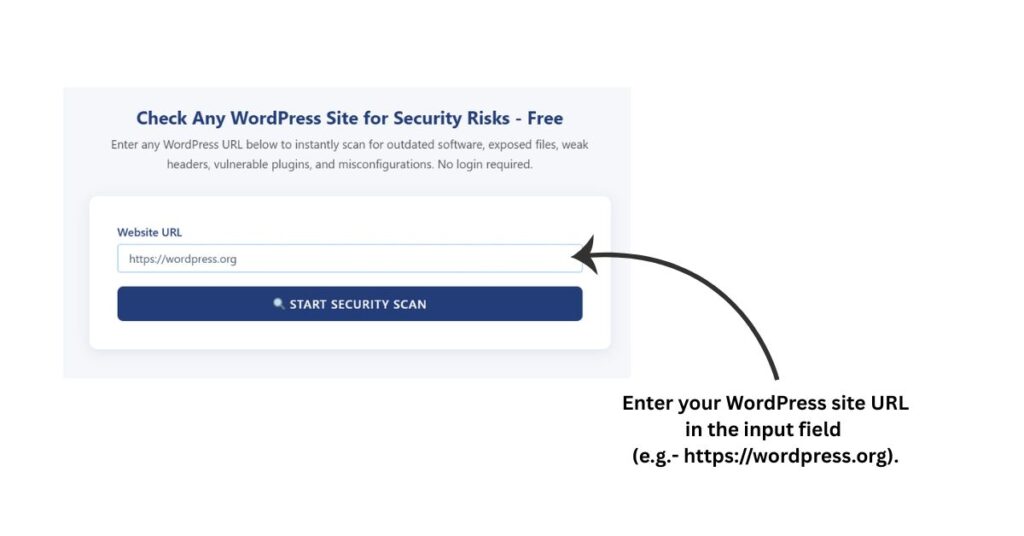
Step1: Enter Your URL
Type or paste your full WordPress site address into the input field. Include the full URL starting with https:// or http:// (e.g., https://yoursite.com).
Step 2: Start the Scan
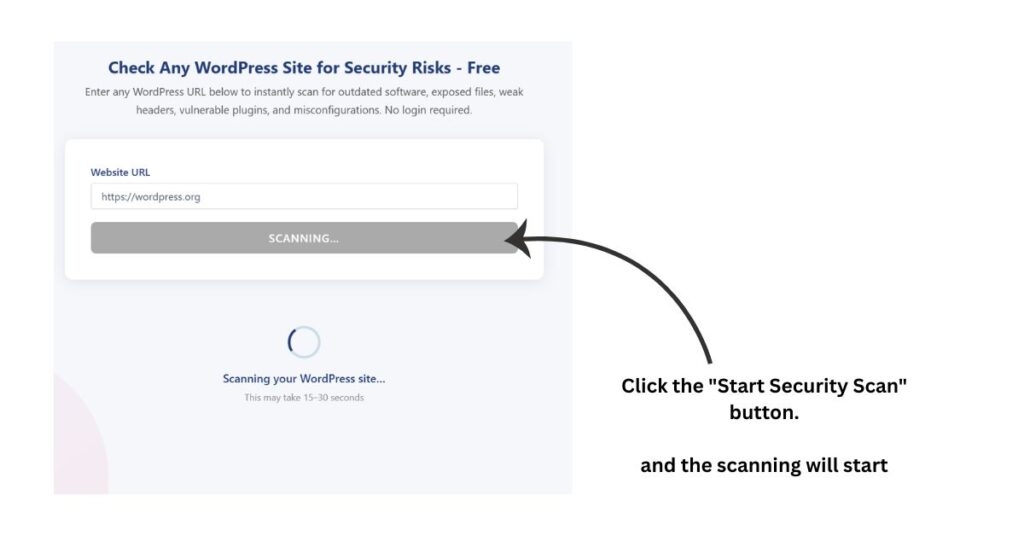
Click the “Start Security Scan” button. The scan takes 15–30 seconds, you’ll see a loading spinner while we check your site.
Step 3: Review Your Security Score
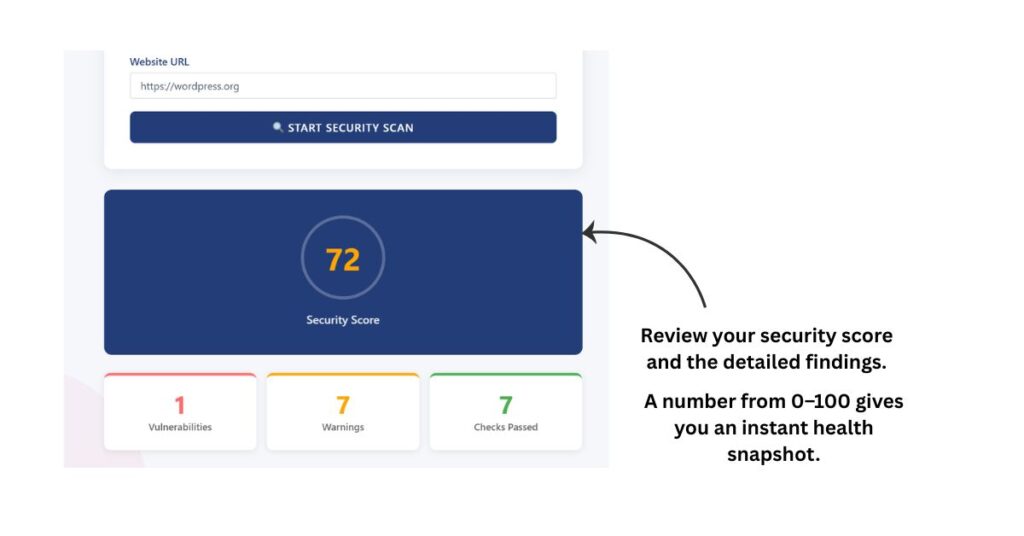
Your Security Score (0–100) appears at the top. A higher score means fewer issues. Use it as a quick health snapshot, but always read the detailed findings for a complete picture.
Step 4: Examine the Detailed Results
Results are grouped into three sections:
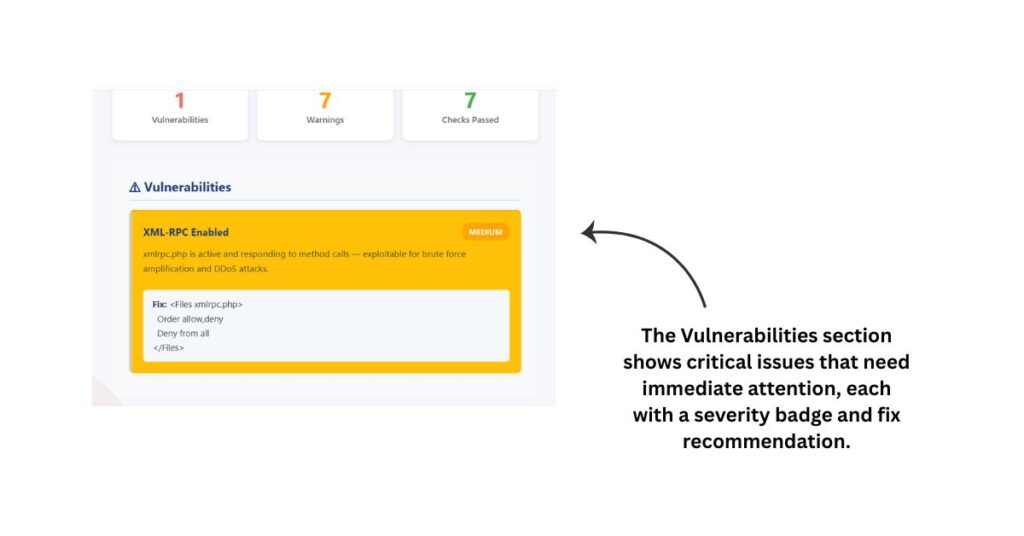
- Vulnerabilities – critical issues that need immediate attention (shown first with a red alert icon).
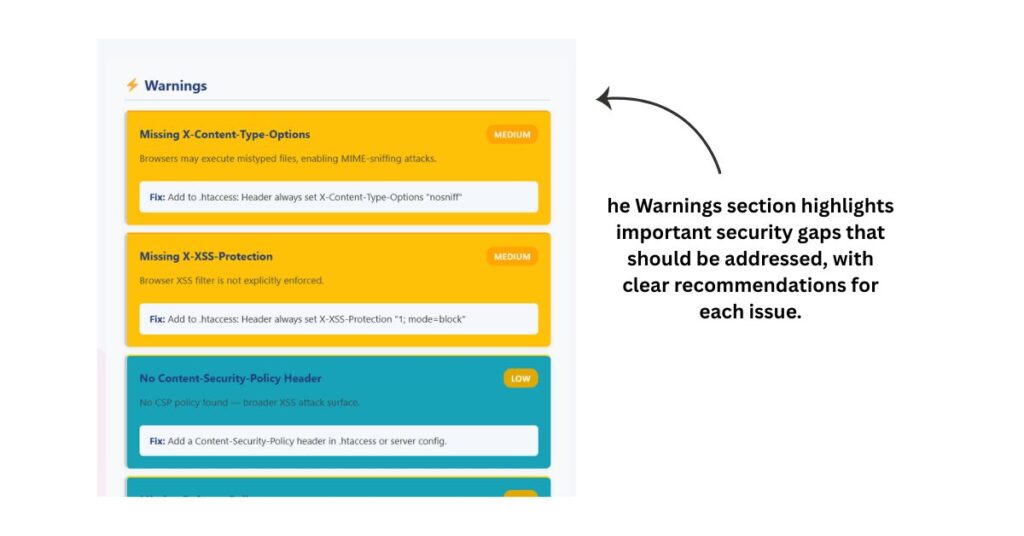
- Warnings – important security gaps that should be addressed (shown second with an orange alert icon).
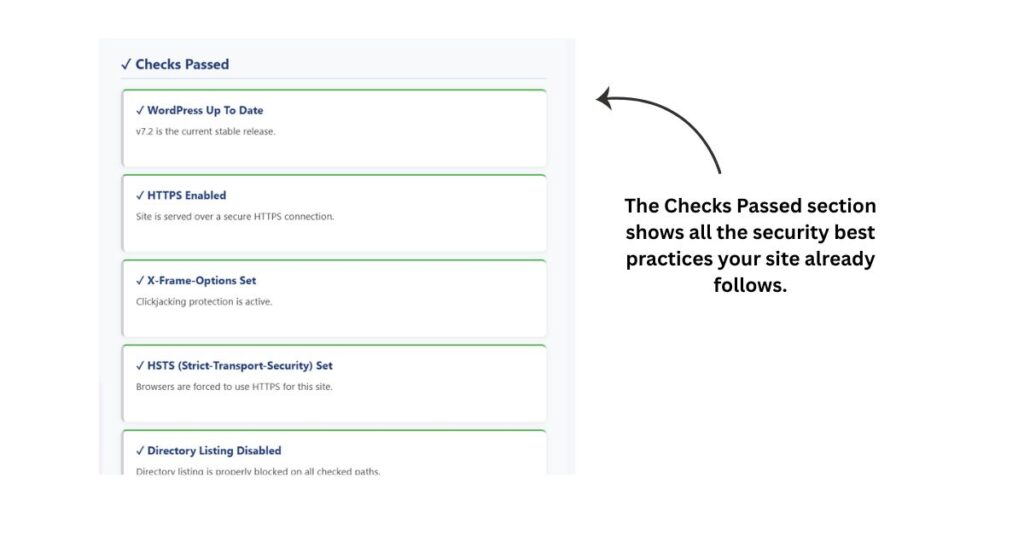
- Checks Passed – security best practices your site already follows (shown last with a green checkmark).
Inside each section, every finding has a severity badge:
- 🔴 Critical / High – red (fix immediately)
- 🟠 Medium – orange (fix soon)
- 🟡 Low – yellow (fix when convenient)
The most urgent issues appear at the top of the list so you know what to tackle first.
Step 5: Follow the Fix Recommendations
Each issue includes:
- A plain‑English explanation of the problem (so you understand the risk).
- A clear action you can take to fix it, often with copy‑and‑paste code snippets for .htaccess or instructions to update a plugin or theme.
Start with the Critical and High severity items, these are the most dangerous. Once those are fixed, work through the Medium and Low items to harden your site further.
You can run the scanner as many times as you like no limits, no paywalls.
Security Score Explained
Your score is calculated based on the severity and number of issues found:
- 90–100 – Excellent: your site has no major external weaknesses.
- 70–89 – Good, but some areas need attention (warnings).
- Below 70 – Multiple vulnerabilities detected; we recommend addressing the critical issues immediately.
The score is a quick gauge, but always read the detailed findings for a complete picture.
Frequently Asked Questions
Is this really free?
Yes its 100% free. No subscriptions, no premium tier, no hidden charges.
Do I need to install anything?
No. It’s an external scanner that works like a browser visit. Nothing is installed on your site.
Will the scan affect my site performance?
No. We only send a few lightweight HTTP requests (about 15 per scan). Your site stays fully operational.
How accurate are the results?
The scanner reliably catches the most common external vulnerabilities. For a deeper inspection (file integrity, malware, database), we recommend a server‑side plugin like Wordfence or Solid Security as a complement.
Can I scan a site I don’t own?
We only recommend scanning websites you own or manage. Scanning without permission may violate terms of service or local laws.
Why do you no longer check for the “admin” username?
We removed that test because it involved a real login attempt against third‑party sites—an unethical and potentially illegal action. Our scanner now stays completely non‑intrusive.
What if the scanner says a plugin is vulnerable but I know it’s updated?
If we couldn’t read your readme.txt (e.g., it’s blocked), we’ll flag it as a warning with a note to manually verify. We never claim a vulnerability unless we have confirmed the installed version is below the patched threshold.
How often should I scan?
A weekly scan is a great habit. Run an extra scan after updating plugins, switching themes, or making major changes.
Why Choose Our WP Scanner Over Others?
| Feature | Our Scanner | Typical Free Scanners |
|---|---|---|
| Privacy | ✅ No logging, no data storage | ❌ Often store IPs and scan history |
| Ethical scanning | ✅ No login attempts, no aggressive probes | ❌ May attempt “admin” login or aggressive enumeration |
| SSRF protection | ✅ IP pinning prevents DNS rebinding | ❌ Often vulnerable to redirection attacks |
| Rate limiting | ✅ Per‑IP and global limits | ❌ Often none – easily abused |
| Plugin version checking | ✅ Tries to read readme.txt for accuracy |
❌ Often compares against latest API (wrong) |
| Clear recommendations | ✅ Plain English with actionable fixes | ❌ Often vague or technical |
Our scanner gives you honest, safe, and actionable results, without the overhead or the risks.
Ready to Check Your Site?
Your security is too important to leave to chance. Use our free WordPress security scanner now and get your site’s health report in under a minute.
This tool is maintained by AntiSpywares.net. We believe in transparent, ethical, and privacy‑respecting security tools for everyone.
Disclaimer: Results from this tool are provided for informational purposes only. While we strive for accuracy, we cannot guarantee that every result is complete or error-free. Always verify important findings using additional methods before making security, technical, or business decisions.
More Website Security & Analysis Tools
Check SSL certificate validity, issuer, expiry date and HTTPS configuration.
Inspect HTTP response headers returned by any website or server.
Scan common TCP ports to identify publicly accessible services.
Evaluate password strength and identify weak credentials.
Validate Apache .htaccess rules and detect syntax errors.