A server admin sets up a new VPS, installs a web server, and opens port 80 for HTTP traffic. Everything looks fine. But a few weeks later, they notice strange database queries coming in from an IP they do not recognize. They never closed port 3306. The firewall was running, but it had not been configured to block that port. That is the exact kind of gap this article is about.
What a Firewall Actually Does
A firewall is a piece of software or hardware that monitors network traffic and decides what to allow or block. Every data packet that enters or leaves your server has to pass through it. The firewall checks each packet against a set of rules you define (or that come preconfigured by default), and then it either lets the packet through, blocks it with a response, or quietly drops it.
That last option dropping packets silently is important. When a firewall drops a packet without responding, the sender gets no confirmation that anything is even there. This is better than sending back a rejection message, which would at least confirm the server exists.
A firewall is not one thing, though. There are different types, and they work in different ways.
Types of Firewalls Worth Knowing
Packet filtering firewalls are the most basic type. They check individual packets based on fixed criteria like IP address, port number, and protocol. They do not look at context. A packet on port 22 is either allowed or blocked, full stop. Most routers have some version of this built in.
Stateful firewalls go further. They track the state of active connections. So if your browser initiates a request to a web server, the firewall remembers that and allows the response back in. A packet trying to sneak in without a corresponding outbound request would get flagged. This is the most common type used on modern servers and VMs.
Web Application Firewalls (WAFs) operate at the application layer. They look at HTTP traffic specifically and can block things like SQL injection attempts, cross-site scripting, and malformed requests. If you run a WordPress site or any kind of web application, a WAF adds a layer of protection that a regular firewall cannot provide.
Each type has its role, and many setups use more than one.
How Ports Fit into This
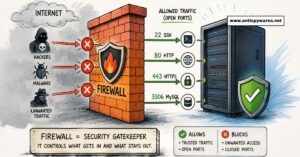
Think of your server like a building with hundreds of doors, each numbered. Those numbers are port numbers. Port 80 is the door for HTTP. Port 443 is for HTTPS. Port 22 is for SSH. Port 3306 is for MySQL. There are 65,535 possible ports in total.
An open port is one where a service is actively listening for incoming connections. A closed port ignores or rejects traffic. The firewall decides which ports are reachable from outside the server.
When you open port 80 on your firewall, you are telling it to allow traffic on that port to pass through to your web server. When you close a port in the firewall, even if a service is running on that port, outside connections cannot reach it. The firewall blocks them before they even get to the service.
This is a critical distinction. A service running on a port does not automatically mean that port is accessible from the internet. The firewall has the final say.
The Relationship Between Firewall Rules and Open Ports
Firewall rules and port status are directly linked. Every firewall rule either opens or closes a port to specific traffic. You can write a rule that only allows your IP address to access port 22, so SSH is technically “open” but only to you. You can allow port 443 to everyone but block port 8080 entirely.
This is where the control lives. The service listens on the port. The firewall decides who gets to reach it.
A common pattern for web servers is to allow ports 80 and 443 from anywhere, allow port 22 only from trusted IP addresses, and block everything else. That keeps the server functional and limits the attack surface.
If you want to see which ports on your server are currently reachable from the outside, the Open Port Checker at antispywares.net lets you scan any domain or IP address. It is a fast way to confirm your firewall rules are actually working the way you think they are.
What Attackers Do With Open Ports
Automated scanners constantly probe IP addresses across the internet looking for open ports. When they find one, they try to identify what service is running there and whether it has known vulnerabilities.
Port 22 with a weak password is a common target for brute force attacks. Port 3306 left open to the public is an invitation to try default MySQL credentials. Port 6379 (Redis) left exposed without authentication has been responsible for a large number of server compromises.
The problem is not that these services are running. It is that they are reachable from the outside when they do not need to be. If your database only needs to talk to your application on the same server, there is no reason for port 3306 to be open to the internet at all.
For a deeper look at how attackers move through open ports once they find them, this post on how attackers use open ports to exploit websites covers the exploitation side in detail.
Mistakes That Leave Your Server Exposed
Assuming the firewall is configured correctly out of the box. Many cloud providers ship VMs with a firewall enabled but with very permissive default rules. Enabled does not mean locked down. Always check what rules are actually in place.
Opening ports and never reviewing them again. A port gets opened for a temporary project or a test setup, and it stays open long after the need is gone. Every unused open port is a forgotten risk. Review your firewall rules regularly, the same way you would update software.
Treating the firewall as the only layer of security. A firewall is a gatekeeper, not a complete defense. Services should also use strong authentication, encryption where applicable, and up to date software. If a firewall rule is accidentally misconfigured, the service itself still needs to hold up.
Blocking inbound traffic but ignoring outbound. A lot of default firewall setups only control what comes in. But if malware or a compromised service is already running on your server, it can make outbound connections freely. Outbound rules matter too.
Confusing firewall rules with DNS or SSL settings. These are separate systems. A firewall blocks or allows traffic at the network level. DNS routes domain names to IP addresses. SSL encrypts the traffic once a connection is established. They work together but do not replace each other. You can check whether your SSL configuration is sound separately using the SSL Certificate Checker.
How to Think About Firewall Configuration
The right starting point is a default-deny approach. Block everything by default, then open only what is necessary. This approach is well documented in the NIST guidelines on firewall policy, which recommend a least-privilege stance as the foundation of any firewall setup. This is the opposite of how some people set up servers, where everything is open and rules are added to block specific threats.
Default deny keeps the attack surface small. You know exactly what is open because you explicitly opened it. Anything you did not think of is blocked automatically.
For most web servers, the minimum necessary ports are 80, 443, and 22 (with SSH restricted by IP if possible). Every other port should be closed unless there is a clear, specific reason to open it. More on which ports to close by default is covered in this post on which ports should always be closed on a web server.
A firewall is only as good as the rules inside it. Getting those rules right, and keeping them current, is the actual work.